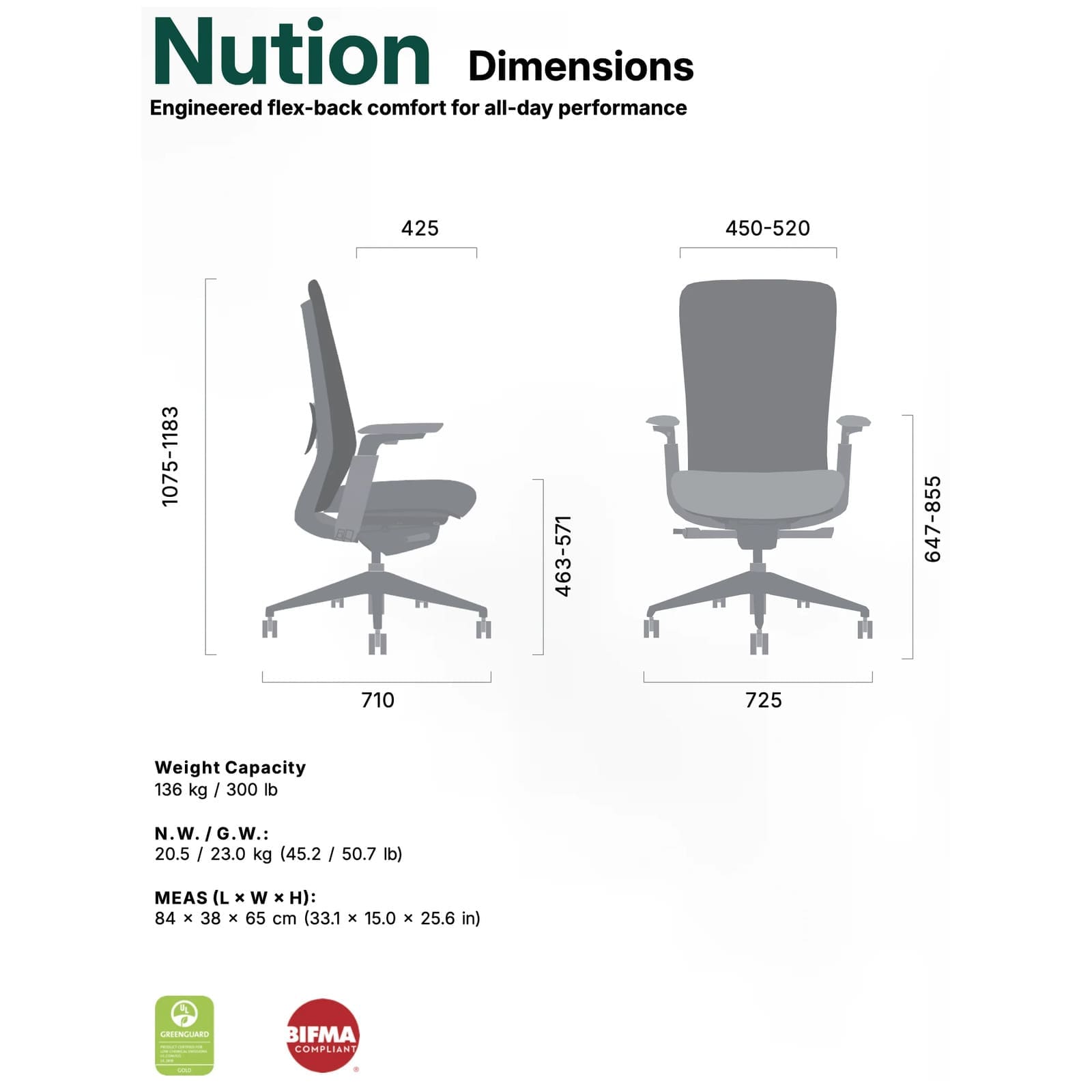
Setting Up the Nution
The Hinomi Nution is designed as an ergonomic office chair for everyday desk work. After assembly, take time to position the chair in relation to your desk, monitor, keyboard, and other frequently used equipment rather than assuming the chair’s initial settings will be right for your workspace.
Finding a Comfortable Working Position
When setting up an ergonomic office chair, make adjustments gradually and evaluate your position while performing the tasks you normally do at your desk. The goal is to find a position that lets you use the chair’s backrest and arm support comfortably without unnecessarily reaching toward your work surface.
- Position the Nution at your desk and sit fully against the backrest.
- Set the chair at a comfortable working height for your desk and keyboard using the chair’s available controls.
- Position yourself so you can comfortably reach your keyboard, mouse, and other frequently used items.
- Use the backrest rather than sitting forward and away from the chair whenever your task allows.
- Evaluate the arm support while performing your normal desk tasks and adjust your workstation positioning as needed.
Using the Backrest
The Nution features a full-height ergonomic backrest with support extending through the upper portion of the chair. Sit back against the chair so the backrest can provide support rather than remaining perched toward the front edge of the seat for extended periods.
Using the Chair Throughout the Workday
Comfortable desk seating does not require remaining completely still. Change your sitting position periodically and make use of the Nution’s available chair controls as appropriate for different activities, such as focused computer work, reading, meetings, or more relaxed sitting.
Setting Up Your Workstation
The chair is only one part of a comfortable workspace. Position the Nution in relation to your desk and frequently used equipment so you can work without excessive reaching or repeatedly moving away from the backrest.
- Position frequently used items within comfortable reach.
- Set the chair at an appropriate height for your work surface.
- Use the backrest and arm support when your work activity allows.
- Reevaluate your chair and workstation setup if you change desks, monitors, keyboards, or other equipment.
Important Use Information
- Follow the assembly and operating instructions supplied by Hinomi before using the chair.
- Make sure all chair components and fasteners are properly installed and secured before sitting in the chair.
- Use adjustment mechanisms only as directed by the manufacturer.
- Periodically inspect the casters, base, armrests, backrest, fasteners, and adjustment mechanisms for looseness or damage.
- Do not continue using the chair if a structural component or adjustment mechanism is damaged or no longer functions properly.
- Refer to the manufacturer documentation supplied with the chair for the applicable maximum weight capacity and other use limitations.
Cleaning and Care
Hinomi’s current Nution product page does not provide model-specific cleaning instructions. Follow the care information supplied with the chair and periodically inspect and clean the upholstery, casters, base, armrests, and adjustment mechanisms as appropriate for the materials used.
Warranty
Hinomi’s current Nution product page displays the company’s 10-Year Warranty messaging but does not provide Nution-specific warranty terms in the accessible product information. Refer to Hinomi’s warranty documentation supplied with the chair or the manufacturer’s current warranty policy for the exact coverage, exclusions, and warranty period applicable to the Nution.